

For in-house content teams, the biggest blocker to effective content recycling is surprisingly simple: access to the original source footage. Most companies only have their final edited videos handy, often with colour grading, music, graphics, and company branding burned in. Useful for publishing, yes. Useful for future projects? Not so much.
When you want to recycle marketing footage, create variants, or repurpose material for new SoMe campaigns, you need access to the clean, unedited files. So the real question becomes: what’s the best way to store source footage so it stays usable, searchable, and high-quality for future use?

Start With Clean, Native Files
If your team or production partner has kept the original material, the first step is simple: archive the clean versions. That means:
- No logos
- No text overlays
- No music
- No baked-in colour grading
Keep the Native Resolution and High Bitrate
For video, always check the native resolution and bit rate straight from the camera. Many teams mistakenly export “intermediate” versions that lose detail. If you want true longevity from your corporate video archive, keep:
- The original resolution (4K, 6K, etc.)
- Ensure high encoding bit rate to keep details in the footage (Especially on dark footage)
This ensures you maintain texture, sharpness, and flexibility for future edits.
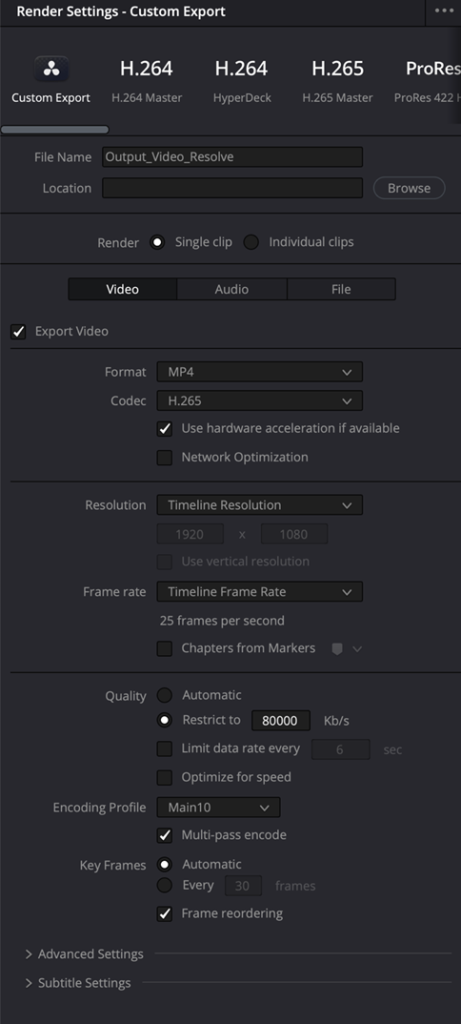
Don’t Downgrade Frame Rates
Another common mistake is exporting everything at a lower frame rate. If something was filmed at 50fps or 60fps, keep it. Why? Because future-you might want slow motion. The moment you convert everything to, say, 25fps, you’ve lost that creative option forever. High-frame-rate footage is incredibly valuable when you’re trying to streamline video production workflow for future campaigns.
Sorting: Store Footage in “Scenes” Instead of Hundreds of Clips
The most effective method is grouping your files into scenes:
- Collect all the best, most usable clips
- Group related angles into one scene file
- Keep 5 to 20 “solid” scenes instead of 800 random scattered clips
This massively simplifies future editing and makes it easier to search and tag video and picture assets inside a cloud-based video and stills library. Think of scenes as “mini raw reels” of moments worth keeping for maximum recyclability.
Apply a Non-Destructive Base Grade
If you have access to RAW or LOG files, applying correct color conversion to Rec709 with gentle base grade will save your future team hours. Good practice includes:
- Protecting highlights
- Adjusting contrast and black levels
- Balancing colour temperature (white balance adjustment for clean skintones)
IMPORTANT:
Do not use heavy LUTs or any destructive grading you can't undo. You want a balanced foundation, not a stylised look baked in. This approach is a huge time saver when recycling content later because you only correct exposure/colour once.
For Photos: Keep Everything Usable in Full Resolution
When it comes to stills:
- Archive all the usable versions
- Keep the full native resolution
- Upload in batches so they stay organised and consistently tagged
High-res originals ensure your content management for enterprise marketing stays flexible, whether you’re exporting tiny thumbnails or 8K versions.
Platforms like Mediacloud.ai automatically generate proxy versions so browsing stays lightning fast, while your originals stay untouched in secure source footage cloud storage.
Make Uploading and Sorting Easy
Your in-house content team shouldn’t fight with folder chaos. That’s why many teams move towards digital asset management for in-house marketing teams, where:
- All videos and stills live in one secure archive
- Every asset is searchable
- Tags, metadata, and consent forms stay connected
- Editors can quickly recycle marketing footage without digging through old drives
On our YouTube channel, you’ll also find full guides to sorting, grading, and uploading footage in DaVinci Resolve, Adobe Premiere, and Lightroom, so teams can get source files organised properly from day one.
Label variant
Body
Title variant
Body
Term
Definition
Question
Key risk: red variant
- List item